Archive

Author Archive

Like Shutter as a better alternative? Help us out!

November 2nd, 2009

AlternativeTo is a useful website covering Windows, Mac, Linux and Online applications for the reasons of, well, finding alternatives!

As Shutter has been touted as an apparent alternative to many Windows solutions (even though that’s not the original intent), it would be great if you people could add your support behind it by “liking” on its webpage. The website supports OpenID login, so registration isn’t a problem!


Shutter on AlternativeTo
http://alternativeto.net/desktop/shutter/

Thanks again :)

Vadim News

Shutter is Ubuntu Koala ready!

October 28th, 2009

The Ubuntu 9.10 “Karmic Koala” is rapidly approaching and due to be released in two days – on October 29, 2009.

Your favorite screenshot program is already prepared for it – Shutter is available in our PPA for the Ubuntu Koala, and works great on it.

Enjoy!

Vadim News

Shutter 0.80 released – great stuff inside

July 5th, 2009

Great things come to those who wait. Shutter 0.80 brings a host of new and important features, existing plugins, bugfixes and translation updates.

Undo / Redo support in the editor

DrawingTool - undo / redoShutters screenshot editor now features undo capability – making it much more forgiving against accidents, and allowing for easier experimentation. This also makes it a rather complete screenshot-oriented image editor, and as far as we know, the first of its kind on Linux ;)

New tools in the editor

The editor also received several useful tools – arrow shape, highlighter, numbered tags, crop tool, and a resizable canvas.

The arrow is a tool of it’s own now – previously it was an image, which wasn’t convenient to access frequently and had some complications when using. Now it’s available on the left toolbar, and functions similarly to the line too.

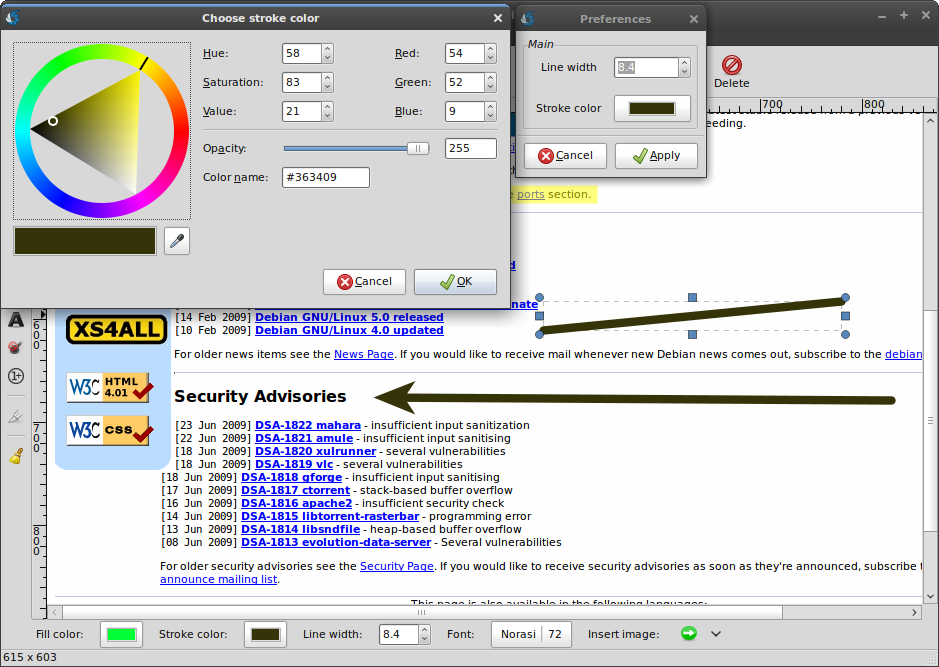
DrawingTool - edit arrow preferences

The highlighter tool, as it’s name implies, is useful for highlighting. While a pencil tool with a large line width, some transparency and a yellow color does the same job, it was inconvenient to switch the color setup from the standard to the ‘highlighting’ mode and back. Now the highlighter is a tool of it’s own, with a nice cursor, making it easier and faster to highlight. Big thanks to Richard Querin of the Inkscape Screencasters fame for providing us with the nice highlighter icon.

DrawingTool - highlighter / marker

Numbered tags – ah, what Shutter was made originally for – aiding in documentation process. Numbered tags stamp a number (that’s auto-incremented each time you use it) on the screenshot, allowing you to clearly detail the steps needed to take in a graphical interface.

DrawingTool - autoincrement shape 2

Crop tool allows you to crop your screenshot ala advanced selection tool for screen capture. You draw a box of the area you’d like to leave, crop, and everything outside of the box is removed with the canvas auto-sized to the new dimensions.

DrawingTool - crop tool

The canvas is now resizable – allowing you to extend it’s dimensions beyond the original screenshot resolution for more stuff, or sizing it down for less stuff. Do as you please! You are the king/queen.

DrawingTool - resizable canvas

Besides that, the editor also received various improvements like a built-in fullscreen mode and an option to clear all the objects you’ve added. The ability open your recently used files has been added to the main window as well.

Read more…

Vadim release , , , , , , , , , ,

Shutter’s first birthday!

April 9th, 2009

Before you know it, it looks like a whole year has passed now from the first public revision of GScrot (what Shutter was previously known as) was published on April 9, 2008, at 21:19. Shutter one year old now! It seems that time passed so quickly, so lets look at what was accomplished in the last year.

Read more…

Vadim News , , , , , , , ,

Upload your Shutter screenshots to Flickr

April 1st, 2009

A new mini-howto is now available that describes how can you upload your screenshots directly to Flickr from Shutter! It’s available in our FAQ & Help section:

Upload your Shutter screenshots to Flickr

Vadim News , , , ,