Home > release > Shutter 0.70 released!

Shutter 0.70 released!

March 5th, 2009

Version 0.70 of Shutter is now available! Get it before the server overloads ;)

This is the first release of Shutter as it is – we’ve just renamed it from GScrot. So you’ll now find it called Shutter inder ApplicationsAccessories, along with a nicer new logo (thanks to Pascal Grochol for the design).

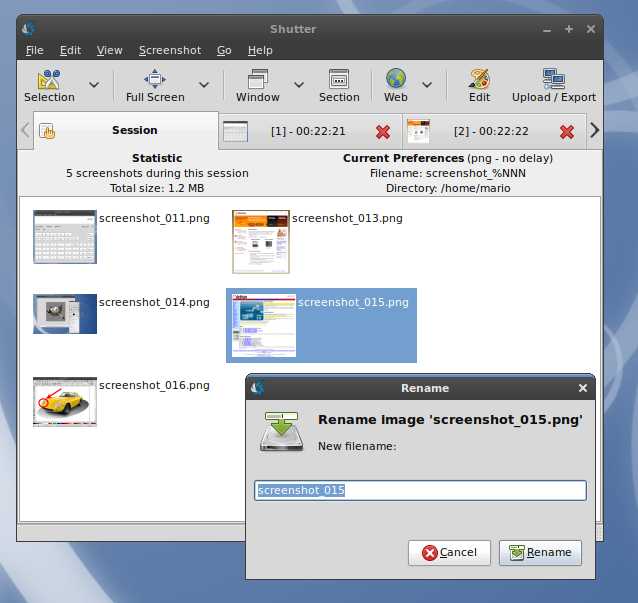
Major updates in this release are printing support, support for a whole lot of formats to save pictures in, support for watching changes to files (open the screenshot externally in gimp, save it – and shutter updates its copy), integration with GVFS (you can upload sites that you’ve connected to via Places ▸ Connect), better recognition for programs that can open a picture, faster thumbnail creation, and improved dialogs!
Digg this too!

Shutter 0.70!

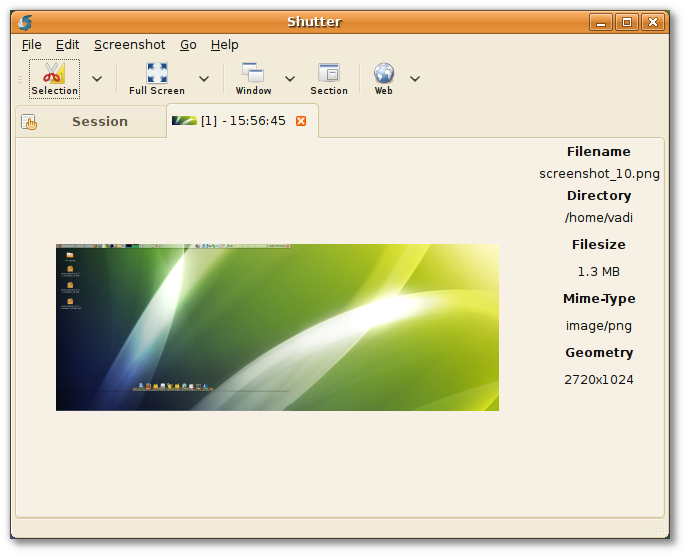
Shutter 0.70!

As if that weren’t enough, here is the full changelog detailing every item updated:

  * General changes
    -- Rebranding from GScrot to Shutter
    -- Exports to and opens all file formats supported by gdk-pixbuf
    -- Added native printing support (instead of gtklp)
    -- Watch opened files via GnomeVFS File Monitor to monitor changes
    -- Integration of GNOME Virtual File System and
       GNOME authentication manager (LP: #310780)
    -- Respect non-rectangular windows (XSHAPE)
       when using metacity (LP: #260771)
    -- Use themeable icons wherever its is possible
    -- Use systemwide MIME Information instead of config file
    -- Move screenshots to trash instead of deleting them (LP: #313003)
    -- Faster thumbail creation and caching
       (improves gui startup when a lot of files are in last session)
    -- Improved Dialogs (e.g. Settings Dialog)
    -- Show context menu for each file in session tab (right click)
  * Gui improvements
    Show current profile in statusbar (LP: #279271)
    Second toolbar removed (LP: #311626)
    Progress bars (LP: #310299)
    -- LP: #311627
    -- LP: #312966
    -- LP: #313346
    -- LP: #326758
  * Drawing Tool
    Scale uniformly (LP: #310708)
    Added standard actions (copy, cut, paste, delete) (LP: #313343)
    Added censor tool to hide private data (LP: #317659)
    -- LP: #310717
    -- LP: #310721
    -- LP: #311574
    -- LP: #311576
    -- LP: #311577
    -- LP: #311580
  * Miscellaneous
    Shutter shows up in GNOME add/remove (LP: #322388)
    Repository is not signed (thanks to the LP Team) (LP: #312681)
  * Plugins
    New hard shadow plugin (thanks to Tualatrix) (LP: #331914)
  * Fixed bugs
    -- LP: #303090
    -- LP: #313761
    -- LP: #316917
    -- LP: #336120
    -- LP: #336126
    -- LP: #336121
    -- LP: #336118
    -- LP: #336133
    -- LP: #336124
  * updated translations

About Shutter:

Shutter is a feature-rich screenshot program. You can take a screenshot
of a specific area, window, your whole screen, or even of a website -
apply different effects to it, draw on it to highlight points, and then
upload to an image hosting site, all within one window.

###

Share and Enjoy:
  • Digg
  • Slashdot
  • Reddit
  • del.icio.us
  • Google Bookmarks
  • Identi.ca
  • StumbleUpon
  • Twitter
  • LinkedIn
  • Facebook
  • Mixx
  • Ping.fm
  • Netvibes

Vadim release , , , , , , , ,

  1. Garve
    March 6th, 2009 at 09:13 | #1

    Klasse, danke!
    Darauf habe ich schon gewartet. Werde es mir sofort holen, sobald ich zu Hause bin.

    Mach(t) weiter so!

  2. March 6th, 2009 at 16:42 | #2

    Great news – really cool tool and impressive development!

  3. March 6th, 2009 at 18:46 | #3

    Some perspective is maybe a good thing here, it’s a screenshot app, right?

    so basically, almost nobody will use it, fantastic!! Software nobody cares about. Admit it, almost nobody screenshots their desktops now and almost nobody gets excited over it, unless you’re “On the team”

    That said, as screenshot apps go, it’s nice, but like the gnome task manager, I can only imagine how much resources goes into using this tool considering the small, tiny job that it should be doing.

    It would be better if the network layer parts were split off and separated into components which could be used in the same way, without having to load up abstraction layers and network layers for uploading screenshots. Cause even if I do make screenshots, of the 1% who might actually do, I would bet than 1% of those upload them anywhere.

    It’s a screenshot app, so lets keep it simple, make a screenshot app that takes sceenshots and a social website abstraction layer that deals with social websites and let them talk to each other, don’t force me to load up code that deals with that, when I dont even wanna use it.

    Please dont reply me (it uses almost *NO* resources at all, bullshit, the gnome task manager can use 31->70% of my cpu to show me what tasks I am running and the blame apparently goes on all those lovely graphics.

    I am sure someone here will understand what I am trying to say, even if all of you don’t.

    • March 6th, 2009 at 19:16 | #4

      We don’t make the gnome system monitor. Wrong place to rant, man…

  4. March 6th, 2009 at 19:01 | #5

    Can you add text to the screen shots before saving them?

    • March 6th, 2009 at 19:15 | #6

      you add text and then save (it’s rather easy)

  5. March 6th, 2009 at 19:40 | #7

    I’ll have to try this out on my laptop, it looks great!

  6. bady
    March 6th, 2009 at 19:49 | #8

    @Christopher Thomas
    wtf? Why are you even reading this, if you don’t care anyway? some people might find this app useful, apparently not you. But do you know what less useful then anything else? Trolls like you. Go piss of some windows users instead, at least they are probably gonna agree to the fact that the gnome task manager is a monster…

  7. Eugene
    March 6th, 2009 at 20:28 | #9

    Nice app. Though It seems as this app is trying to be a picture viewer/editor as well as a screenshot taker. It would be better if the picture viewing/editing part could be a part of a separate app like eog or f-spot, and the screenshot program could just show the screenshot in the user’s chosen viewer/editor. If you know the unix “do one thing and do it well” philosophy – that’s what I’m basically suggesting. You’ll do more good that way.

  8. March 6th, 2009 at 20:34 | #10

    @Eugene

    We don’t want to be DE-specific, and there is no agonistic tool sans Gimp (which we support) to use really. This is just for screenshot-special touch-ups – adding arrows, highlighting things, etc. Something that standard image editing aren’t designed for.

  9. Trolly McTrollsalot
    March 6th, 2009 at 20:40 | #11

    Christopher Thomas is a hater and everybody knows that haters don’t use screenshot applications. They only use the computer to load the task monitor so that they can complain on blogs about programs that take up what they consider to be too many system resources. “OMG I caNt beleeev teh video encodor takeZ so longggs for teh process0rz tihs softwwarez is teh crap. BTW Slackware FTW!!!”

  10. Locke B.
    March 6th, 2009 at 22:29 | #12

    It is a bit bloated for a screenshot utility, but I’d consider this a full fledged screenshot _application_, being much lighter than The GIMP, which I would end up using to censor, crop, and highlight screenshots taken by the more conventional screenshot utilities.

    I like it, and use. Good job.

    One non-critical suggestion: Would there be a way to add a Delayed Screenshot button or dropdown in a tasteful way? Many of the screenshots I take involve menu’s, which can only (to my knowledge) be taken with a delay. Going into the preferences every time to toggle delay can become tiresome.

  11. March 6th, 2009 at 22:37 | #13

    @Locke B.

    Valid feedback, I’ll make sure to update the wording to application / tool. (edit: actually, we won’t call it a ‘utility’ anywhere)

    I’m somewhat hesitant to add preferences options on the main interface, because quite a few could be on there. How about easier profile switching? So you make a profile with delays, and another with non-delays – and use some quick way (either button on main interface or keybinding) to switch between them.

    Atm we show which profile are you using in the status bar.

  12. David Ryder
    March 7th, 2009 at 05:07 | #14

    Just a couple friendly suggestions:

    1) Change the description from “screenshot tool” to something that covers a broader base – just to squelch all the ridiculous haters and inform people that they are getting more than a screenshot tool. I am a screenshot whore myself and use them daily.

    2) Maybe release a fork of this app that only does screenshot/upload. The script I wrote uses scrot/imagemagick/zenity to send a Windowed/Full Screen/Selection screenshot to imageshack or FTP and puts the resultant URL in your clipboard. If you are interested in any help with this I would be more than happy to help. I have been wanting to port this script to an app for quite some time!!

    If you reply, please notify me via email :)

  13. Zac
    March 7th, 2009 at 11:46 | #15

    Good work people. Just added the ppa, looking forward to the updates.

    I found tools like this useful as a reference for myself and to help others.

  14. azeey
    March 7th, 2009 at 17:00 | #16

    Cool app. This may have been asked before but do you have any plans to make this into a screencast app?

  15. March 8th, 2009 at 01:35 | #18

    @Christopher Thomas
    I take screenshots several times per day – so does my mates. People still take screenshots, and this application makes it more fun.

  16. March 8th, 2009 at 14:12 | #19

    This is an awesome tool. 10 times better than hitting the “Print Scrn” button !!

  17. March 8th, 2009 at 18:52 | #20

    Hey, do not worry about morons like Mr.C.T. – he might be right, but this kind of complaint is not helpful. SO WHAT?

    I have been looking for something like this and I am glad and will defintly use it (and I really need it several times daily!) With this tool it has been the last time that I cried for my old Powerbook… Very nice, thank you!

    *spread the word*
    andreea

  18. March 9th, 2009 at 08:36 | #21

    nice app, always use ’scrot’ from the command line but may give this a go

  19. iksik
    March 9th, 2009 at 14:17 | #22

    Hi,

    For first of all… It’s great software. But.. :) there are missing some usabillity related things. (which I hardcoded by my self). After making a screenshot and send it into FTP server it would be nice, to have URL in clipboard, or just opened in webbrowser.

  20. Romario
    March 9th, 2009 at 15:09 | #23

    @iksik
    Copy the URL to the clipboard is a nice idea. I’ve opened a bug for this request https://bugs.launchpad.net/shutter/+bug/339920 . Thanks.

  21. Vadim P.
    March 9th, 2009 at 15:15 | #24

    @iksik

    What if the location of the images on the ftp server is different than the displayed path? It simply wouldn’t work then.

    I wouldn’t consider it a “usability problem” at all.

  22. Echo
    March 9th, 2009 at 23:30 | #25

    Love the desktop image. Is it available for download? :)

  23. Echo
    March 10th, 2009 at 00:15 | #27

    Thanks Vadim!

  24. Randall Schwartz
    March 10th, 2009 at 05:04 | #28

    Im impressed that a free software project has actually gotten rid of a name which sounds like scrotum to one which actually makes sense and indicates what the software does.

    Now if we can get the Gimp, Jokosher and a few other idiotic one to follow suit….

    And since it doesnt need any Mono to run, Ill give it a run through,…

  25. iksik
    March 10th, 2009 at 13:03 | #29

    Vadim P. :
    @iksik
    What if the location of the images on the ftp server is different than the displayed path? It simply wouldn’t work then.
    I wouldn’t consider it a “usability problem” at all.

    It should be provided in settings – look at JING from techsmith… There is no such problem there…

    • March 10th, 2009 at 15:49 | #30

      Doesn’t run on Linux, and I can’t be bothered to tinker with Wine for it, sorry. I guess we can provide a regex search & replace for the people who’d want it but again, I don’t see the “usability problem” here still – and by that I imply an unusable interface.

  26. March 12th, 2009 at 09:34 | #31

    I wonder if this will get into gnome or at least replace the other tool currently in gnome linux distros.

    Congrats for the project and new release :)

  27. Vadim P.
    March 12th, 2009 at 14:51 | #32

    @Dread Knight

    Getting into Gnome would be good (but the forced infrastructure move doesn’t strike me fancy).

  28. Vadim P.
    March 12th, 2009 at 23:25 | #33

    David Ryder :
    Just a couple friendly suggestions:

    2) Maybe release a fork of this app that only does screenshot/upload. The script I wrote uses scrot/imagemagick/zenity to send a Windowed/Full Screen/Selection screenshot to imageshack or FTP and puts the resultant URL in your clipboard. If you are interested in any help with this I would be more than happy to help. I have been wanting to port this script to an app for quite some time!!

    We don’t have time for this right now, so we wouldn’t be looking into this – but if you’d like to do it, you’re welcome to. Mario said perhaps a nautilus script with context actions for screenshots to upload them that utilizes the shutter api would work.

  29. Bradley Jarvis
    March 15th, 2009 at 10:00 | #34

    @Christopher Thomas
    No ones “forcing” you to use any application, if you don’t like it don’t use it.

  30. March 25th, 2009 at 05:44 | #35

    This is great guys, I’ll be keeping an eye on this. I’ve been growing more and more attached to the Screenshot->Editor->Ftp->Clipboard functionality of Jing, and this is the closest thing I’ve found to it so far (at least on linux). Keep up the good work, and I totally agree with David Ryder, copying the URL to your clipboard is all this app needs to be a huge tool for the web development process. I would be extremely interested in seeing that happen.

  31. March 25th, 2009 at 13:53 | #36

    @Seth Newton

    We’re planning to add this improvement in the 0.90 milestone.

  32. Archis Bhave
    October 20th, 2009 at 08:24 | #37

    You people rock. Please keep it up.

  33. Christian I. Ionescu
    November 17th, 2009 at 08:15 | #38

    Hi!

    Firstly, thank you for this great application that could be used in infinite ways.

    Secondly, I have a question: how could I make it take a regular screenshot and save it in a certain folder. I would like to make it take a screenshot of the full screen at each 10 minutes and save it in a certain folder.

    God bless us all!
    Christian

  34. tony
    December 12th, 2009 at 14:27 | #39

    Hi, this is great, I’m creating HOWTO’s to teach my wife how to do net banking with the KeePass password program, which automates the URL fetching and the entry of username/passsword. To be able to grab good screenshots and immediately annotate them is a gift. Great work and thank you.

  1. No trackbacks yet.